I’ll be in contact with you until the project officially comes to an end at end of September and into October. Here is a recap of requirements.
1. The stories must be written in PowerPoint or similar and must contain a Title page, an End page and 6 - 16 'chunks' or paragraphs each with an illustration. (If the stories are written in another language they need to have an English translation sent in on a separate Word document.)
2. The stories can be written on one’s own template or you can use the African Storybook template found in Downloads on the blog
3. There should be a creative commons license copied and pasted under the author's name as shown in Week 4.4 The six Creative Commons licenses in a copy and paste format.
4. Stories must reach us by 30th September or before if possible. With regard to your students writing we can accept stories in October as well.
5. For a certificate from the African Storybook Project one needs to provide an illustrated story suitable for a beginner reader according to the Levels on the website following the guidelines provided in ‘Week 2.6 Webinar recording and downloadable presentations’ where Lorato’s presentation entitled ‘Beginning Readers and Project Levelling Guidelines’ However Lorato did say in the webinar that if you feel more comfortable writing for Level 3 or 4 you should continue to do so.
6. We’d love you to get your class writing, if you are a teacher with a class.
7. We’d love you to continue writing for the African Storybook Project!
8. Please, please, PLEASE send us photos of you writing, your class writing and any little experiences that I can convert into blogposts to use on the blog. I’ll place an example on the blog from last year’s teachers.
Thank you so much for joining us on this venture! I will still be communicating with you regularly till the course proper comes to an end at the nd of September and into October.
Now that our writing course as such is over the question is 'How do I get my story to you?' I thought I would share three methods and add screencast videos that I have made specially to show you the steps if necessary. Remember though, the writing is not over yet! We would LOVE you to get your class writing as well.
1. Email your story
The easiest way, when you only have one story to send, is to email it to me. Gmail (Google’s free email) allows big file sizes so this could be possible if you use Gmail. Email me at fiona@schoolnet.org.za. But:
*The problem comes when you have too many stories to send
*A problem could arise if you don’t use Gmail and your service provider only allows much smaller files.
In those cases it would be better to use one of the next two options
2. Share your story with me in Dropbox even if you haven’t joined Dropbox (via Dbinbox.com)
There is a marvellous little Dropbox application called Dbinbox.com that allows others to send their files to your Dropbox account regardless of whether or not they have their own Dropbox account. Dbinbox.com accepts file that are below 50MB in size.
This is how it works:
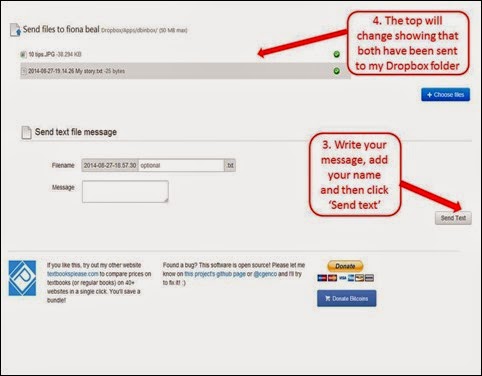
Step 1: In your browser paste the following link: http://dbinbox.com/fionabeal. A page will open that says ‘Send files to fiona beal’
Step 2: Find the file you wish to send either by dragging it across or by selecting the file from the ‘Choose files’ button. Add a message to me if you like.
Step 3: You’ll notice the file loading and I will receive it in my Dropbox. I’ll keep a record of files received on the course blog.
Screencast of this method
Here is the screen cast showing the steps live so to speak!
3. Send your story to me via Google Drive
It is also easy to share your file with someone using Google Drive. There are several ways of doing this.
a) One way is that if you have uploaded your story to Google Drive you can simply click on the Share button on the right and share the link with me. Jut remember to select 'Can edit' in the options
b) Here is another of those ways. I have created a screencast to demonstrate this. In Google Drive I have created a shared folder called Digital Storytelling Course 2014. Here is the rather long link: https://drive.google.com/folderview?id=0B8dgaIfG-77gRWRmeXB0Ql9XTTA&usp=sharing
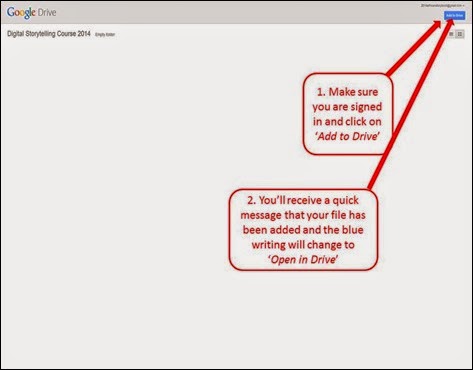
Step 1: Paste the link into your browser and press enter. You’ll be taken to Google Drive folder called Digital Storytelling Course 2014.
- Make sure you are signed in to Google with your Google account details and click on ‘Add to Drive’.
- You’ll receive a quick message that your file has been added and then the blue writing will change to ‘Open in Drive’
Step 2: You’ll receive a quick message saying that it has been added to your Drive and the blue writing will now say ‘Open in Drive’. Click on ‘Open in Drive’.
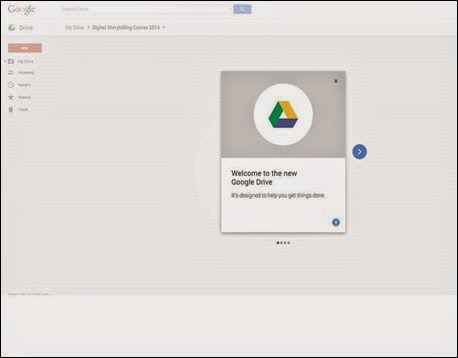
Step 3: You’ll be taken into your Google Drive and if you have never used it before just follow the prompts.
Step 4: Upload your folder to Google Drive and move it into the shared folder. I’ll receive it and will add it to the record of received files on the blog.
Screencast of this method
Here is a screencast showing you step by step how this is done.
I am really looking forward to receiving these by the end of the third term if possible (end of September). Please do get your students writing now, if you have a class, so that the African Storybook team can have a great selection of stories to choose from for their website.
This webinar was the fifth and final webinar in the current Digital Storytelling and the African Storybook Project course. During this webinar Fiona concentrated on the different free a story can be uploaded to the Internet and shared with others - either as a presention or a movie. Lorato closed off with some encouragements for writing stories for the African Storybook Project.
Take note - How your final story should be submitted
Please remember that this i an additional week with furhter ideas for your story. The African Storybook team would like your stories in presentation form only with text, images, details and the recommended Creative commons license displayed. Their template can be used for this or you can use your own template.
The webinar summary
Meeting Name: Converting your digital story to an online presentation or a video
Summary: In the final week participants will be given the option of adding different elements to their stories such as narration and music. We will look at ways of converting the story to an online presentation or video
Presenter: Fiona Beal (fiona@schoolnet.org.za)
Date: 21 August 3:15 PM - 3:45 PM
Time Zone: (GMT+02:00) Pretoria
Duration: 30+ minutes
Webinar recording ‘Converting your stories to an online presentation or video’
The recording can be found and listened to on this link:
http://meet78641452.adobeconnect.com/p2i32xw8vqe/
Presentation for the webinar
Here is the downloadable presentation for ‘Converting your story to an online presentation or video' .